Importing and exporting data
This section describes the available tools to import and export data.
Overview
Spine database editor supports importing and exporting data in three different formats: SQLite, JSON, and Excel. The SQLite import/export uses the Spine database format. The JSON and Excel import/export use a specific format described below.
Tip
To create a template file with the JSON or Excel format you can simply export an existing Spine database into one of those formats.
Excel format
The Excel format consists of one sheet per object and relationship class. Each sheet can have one of four different formats:
Object class with scalar parameter data:

Object class with indexed parameter data:
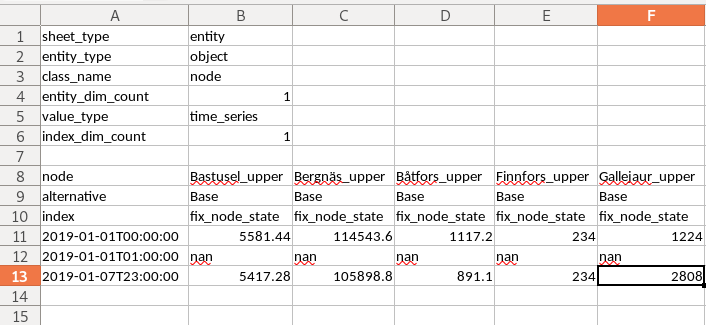
Relationship class with scalar parameter data:
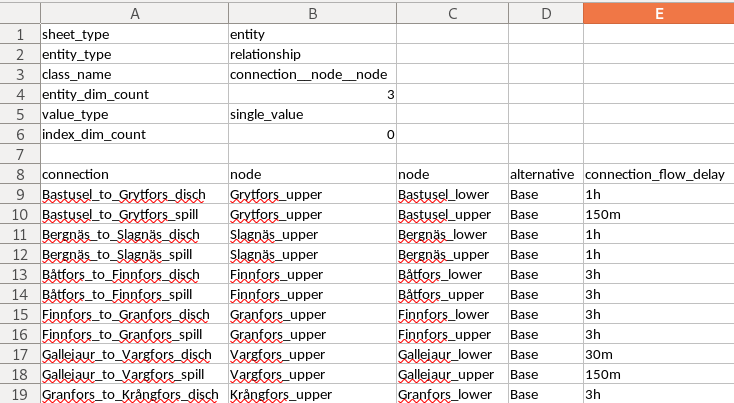
Relationship class with indexed parameter data:

JSON format
The JSON format consists of a single JSON object with the following OPTIONAL keys:
object_classes: the value of this key
MUSTbe a JSON array, representing a list of object classes. Each element in this arrayMUSTbe itself a JSON array andMUSThave three elements:The first element
MUSTbe a JSON string, indicating the object class name.The second element
MUSTbe either a JSON string, indicating the object class description, or null.The third element
MUSTbe either a JSON integer, indicating the object class icon code, or null.
relationship_classes: the value of this key
MUSTbe a JSON array, representing a list of relationships classes. Each element in this arrayMUSTbe itself a JSON array andMUSThave three elements:The first element
MUSTbe a JSON string, indicating the relationship class name.The second element
MUSTbe a JSON array, indicating the member object classes. Each element in this arrayMUSTbe a JSON string, indicating the object class name.The third element
MUSTbe either a JSON string, indicating the relationship class description, or null.
parameter_value_lists: the value of this key
MUSTbe a JSON array, representing a list of parameter value lists. Each element in this arrayMUSTbe itself a JSON array andMUSThave two elements:The first element
MUSTbe a JSON string, indicating the parameter value list name.The second element
MUSTbe a JSON array, indicating the values in the list. Each element in this arrayMUSTbe either a JSON object, string, number, or null, indicating the value.
object_parameters: the value of this key
MUSTbe a JSON array, representing a list of object parameter definitions. Each element in this arrayMUSTbe itself a JSON array andMUSThave five elements:The first element
MUSTbe a JSON string, indicating the object class name.The second element
MUSTbe a JSON string, indicating the parameter name.The third element
MUSTbe either a JSON object, string, number, or null, indicating the parameter default value.The fourth element
MUSTbe a JSON string, indicating the associated parameter value list, or null.The last element
MUSTbe either a JSON string, indicating the parameter description, or null.
relationship_parameters: the value of this key
MUSTbe a JSON array, representing a list of relationship parameter definitions. Each element in this arrayMUSTbe itself a JSON array andMUSThave five elements:The first element
MUSTbe a JSON string, indicating the relationship class name.The second element
MUSTbe a JSON string, indicating the parameter name.The third element
MUSTbe either a JSON object, string, number, or null, indicating the parameter default value.The fourth element
MUSTbe a JSON string, indicating the associated parameter value list, or nullThe last element
MUSTbe either a JSON string, indicating the parameter description, or null.
objects: the value of this key
MUSTbe a JSON array, representing a list of objects. Each element in this arrayMUSTbe itself a JSON array andMUSThave three elements:The first element
MUSTbe a JSON string, indicating the object class name.The second element
MUSTbe a JSON string, indicating the object name.The third element
MUSTbe either a JSON string, indicating the object description, or null.
relationships: the value of this key
MUSTbe a JSON array, representing a list of relationships. Each element in this arrayMUSTbe itself a JSON array andMUSThave two elements:The first element
MUSTbe a JSON string, indicating the relationship class name.The second element
MUSTbe a JSON array, indicating the member objects. Each element in this arrayMUSTbe a JSON string, indicating the object name.
object_parameter_values: the value of this key
MUSTbe a JSON array, representing a list of object parameter values. Each element in this arrayMUSTbe itself a JSON array andMUSThave four elements:The first element
MUSTbe a JSON string, indicating the object class name.The second element
MUSTbe a JSON string, indicating the object name.The third element
MUSTbe a JSON string, indicating the parameter name.The fourth element
MUSTbe either a JSON object, string, number, or null, indicating the parameter value.
relationship_parameter_values: the value of this key
MUSTbe a JSON array, representing a list of relationship parameter values. Each element in this arrayMUSTbe itself a JSON array andMUSThave four elements:The first element
MUSTbe a JSON string, indicating the relationship class name.The second element
MUSTbe a JSON array, indicating the relationship’s member objects. Each element in this arrayMUSTbe a JSON string, indicating the object name.The third element
MUSTbe a JSON string, indicating the parameter name.The fourth element
MUSTbe either a JSON object, string, number, or null, indicating the parameter value.
Example:
{
    "object_classes": [
        ["connection", "An entity where an energy transfer takes place", 280378317271233],
        ["node", "An entity where an energy balance takes place", 280740554077951],
        ["unit", "An entity where an energy conversion process takes place", 281470681805429],
    ],
    "relationship_classes": [
        ["connection__node__node", ["connection", "node", "node"] , null],
        ["unit__from_node", ["unit", "node"], null],
        ["unit__to_node", ["unit", "node"], null],
    ],
    "parameter_value_lists": [
        ["balance_type_list", ["\"balance_type_node\"", "\"balance_type_group\"", "\"balance_type_none\""]],
        ["truth_value_list", ["\"value_false\"", "\"value_true\""]],
    ],
    "object_parameters": [
        ["connection", "connection_availability_factor", 1.0, null, null],
        ["node", "balance_type", "balance_type_node", "balance_type_list", null],
    ],
    "relationship_parameters": [
        ["connection__node__node", "connection_flow_delay", {"type": "duration", "data": "0h"}, null, null],
        ["unit__from_node", "unit_capacity", null, null, null],
        ["unit__to_node", "unit_capacity", null, null, null],
    ],
    "objects": [
        ["connection", "Bastusel_to_Grytfors_disch", null],
        ["node", "Bastusel_lower", null],
        ["node", "Bastusel_upper", null],
        ["node", "Grytfors_upper", null],
        ["unit", "Bastusel_pwr_plant", null],
    ],
    "relationships": [
        ["connection__node__node", ["Bastusel_to_Grytfors_disch", "Grytfors_upper", "Bastusel_lower"]],
        ["unit__from_node", ["Bastusel_pwr_plant", "Bastusel_upper"]],
        ["unit__to_node", ["Bastusel_pwr_plant", "Bastusel_lower"]],
    ],
    "object_parameter_values": [
        ["node", "Bastusel_upper", "demand", -0.2579768519],
        ["node", "Bastusel_upper", "fix_node_state", {"type": "time_series", "data": {"2018-12-31T23:00:00": 5581.44, "2019-01-07T23:00:00": 5417.28}}],
        ["node", "Bastusel_upper", "has_state", "value_true"],
    ],
    "relationship_parameter_values": [
        ["connection__node__node", ["Bastusel_to_Grytfors_disch", "Grytfors_upper", "Bastusel_lower"], "connection_flow_delay", {"type": "duration", "data": "1h"}],
        ["unit__from_node", ["Bastusel_pwr_plant", "Bastusel_upper"], "unit_capacity", 127.5],
    ]
}
Importing
To import a file, select File –> Import from the hamburger menu. The Import file dialog will pop up. Select the file type (SQLite, JSON, or Excel), enter the path of the file to import, and accept the dialog.
Tip
You can undo import operations using Edit -> Undo.
Exporting
Mass export
To export items in mass, select File –> Export from the hamburger menu. The Export items dialog will pop up:
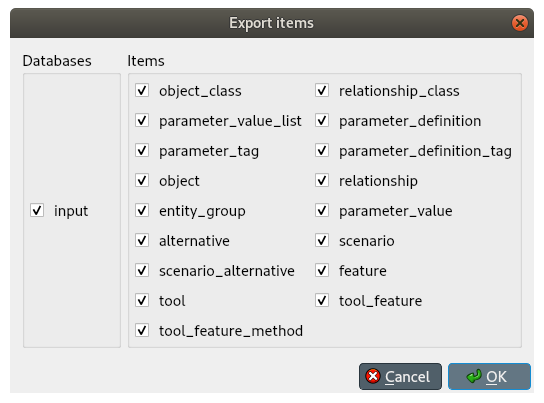
Select the databases you want to export under Databases, and the type of items under Items, then press Ok. The Export file dialog will pop up now. Select the file type (SQLite, JSON, or Excel), enter the path of the file to export, and accept the dialog.
Selective export
To export a specific subset of items, select the corresponding items in either Object tree and Relationship tree, right click on the selection to bring the context menu, and select Export.
The Export file dialog will pop up. Select the file type (SQLite, JSON, or Excel), enter the path of the file to export, and accept the dialog.
Session export
To export only uncommitted changes made in the current session, select File –> Export session from the hamburger menu.
The Export file dialog will pop up. Select the file type (SQLite, JSON, or Excel), enter the path of the file to export, and accept the dialog.
Note
Export operations include all uncommitted changes.
Accessing/using exported files
Whenever you successfully export a file, a button with the file name is created in the Exports bar at the bottom of the form. To open the file in your registered program, press that button. To open the containing folder, click on the arrow next to the file name and select Open containing folder from the popup menu.