Scenarios and Alternatives
One of the prominent features of Spine Toolbox is scenarios. Scenarios are datasets which are composed of alternatives such that they form a meaningful whole. Examples of scenarios could include high_price, low_price or coal_and_wind. Scenarios can be build in the Database Editor and, through scenario filters, they affect what data is passed to tools and how a workflow is executed.
Parameter Values, Alternatives and Scenarios
The first use case for alternatives is to define alternative values for parameters in Spine data. For instance, consider you had an entity class “fruit” which has a parameter “price” and two types of fruits, “apples” and “oranges”. The prices of both fruits depends on how good the harvest is, and this can be modelled nicely with alternatives:
Class |
Entity |
Alternative |
Price |
|---|---|---|---|
fruit |
apple |
Base |
10 |
fruit |
apple |
bad_harvest_apple |
15 |
fruit |
orange |
Base |
13 |
fruit |
orange |
bad_harvest_orange |
18 |
The prices in the “Base” alternative are the usual prices while the two additional alternatives contain occasional high prices for the corresponding fruits. In a sense, alternatives are just additional dimension of the value: the triplet “fruit”, “apple” and “Base” uniquely identifies the price of 10.
Now, let’s build some scenarios from the fruit price data:
Scenario |
Alternatives |
|---|---|
base |
Base |
costly_apples |
Base, bad_harvest_apple |
costly_oranges |
Base, bad_harvest_orange |
costly_everything |
bad_harvest_apple, bad_harvest_orange |
The “base” scenario consists of the “Base” alternative only. The price of an apple in that scenario is 10 while an orange costs 13. In the “costly_apples” scenario, on the other hand, the fruit prices would be derived in the following way:
Fruit |
Base |
bad_apple_harvest |
Price in scenario |
|---|---|---|---|
apple |
10 |
15 |
15 |
orange |
13 |
– |
13 |
Because apple has more than one price in the costly_apples scenario, we need to pick one of them. Which price “wins”, depends on the order in which the alternatives are in the scenario: the last one overrides the other prices. Note, that since the price for orange is defined only in the Base alternative in costly_apples, it is that price that holds up.
Let’s now look at the price formation in the “costly_oranges” scenario:
Fruit |
Base |
bad_orange_harvest |
Price in scenario |
|---|---|---|---|
apple |
10 |
– |
10 |
orange |
13 |
18 |
18 |
This time it is the orange that gets its high price from the bad_orange_harvest alternative which overrides the orange price in the Base alternative.
In the fourth scenario, costly_everything, the fruits get their high prices from the two alternatives:
Fruit |
bad_apple_harvest |
bad_orange_harvest |
Price in scenario |
|---|---|---|---|
apple |
15 |
– |
15 |
orange |
– |
18 |
18 |
In an imaginary scenario with just bad_apple_harvest or bad_orange_harvest, one of the fruits would not have a price at all.
Entities and Alternatives
The second use case for alternatives is to control the visibility of entities in scenarios. This feature is called entity alternatives. If an entity alternative is deduced to be false in a scenario, the entity is invisible. Conversely, if entity alternative is true, the entity is visible.
Note
Entity alternatives are usually defined only for 0-dimensional entities since any higher-dimensional entity will be invisible in a scenario anyway if any of its elements is invisible.
If no entity alternative is defined for an entity, its visibility depends on the active_by_default setting of its class. Entities of classes which have active_by_default set to true are visible by default while you have to explicitly set entities visible in classes where active_by_default is false.
Otherwise, entity alternatives work much like parameter value alternatives with latter alternatives overriding earlier ones in scenarios.
Let’s say we add banana to our database containing the alternatives and scenarios of the previous section and define the following entity alternatives for it:
Entity |
Base |
bad_apple_harvest |
bad_orange_harvest |
|---|---|---|---|
banana |
– |
false |
true |
The visibility of banana in each scenario is deduced the following way:
Scenario |
Base |
bad_apple_harvest |
bad_orange_harvest |
banana visible |
|---|---|---|---|---|
base |
– |
depends on active_by_default |
||
costly_apples |
– |
false |
no |
|
costly_oranges |
– |
true |
yes |
|
costly_everything |
false |
true |
yes |
Because the base scenario contains only the Base alternative which for there is no entity alternative for banana, banana’s visibility depends on the active_by_default setting of the fruit class. In the costly_apples scenario, the entity alternative set for banana in the bad_apple_harvest alternatives overrides the default value making banana invisible in the scenario. Similarly, in costly_oranges, bad_orange_harvest overrides the default value making banana visible. The costly_everything scenario, on the other hand, is defined such that the entity alternative for banana from bad_orange_harvest overrides the value from bad_apple_harvest making banana visible.
Scenario Filters: Scenarios in the Workflow
Scenario filter is the machinery that can be applied to a database containing Spine data that makes the database appear as if it contained only the scenario’s dataset. Anyone who reads the data will see the “winning” parameter values, as well as entities that are deduced to be visible in the scenario through entity alternatives.
The scenarios a workflow will use are set in Link properties of links which have Data Stores as sources as explained in Links and Loops. The direct successors of the Data Store will get a specific database URL that contains the scenario name and applies the filter it is used to instantiate a database mapping.
Note
If multiple scenarios are selected in Link properties, the successor items will be executed in parallel, each execution running a different scenario.
Alternative Filter: Useful for Result Datasets
Scenarios are a powerful tool when building input datasets. However, when inspecting the output of Tools, or when e.g. there is need to copy a specific subset of a dataset from one database to another, alternative filter may become handy. When using alternative filter, you select multiple alternatives for the filter. After the filter is applied to Spine data, values and entities in all selected alternatives are visible. This is in contrast to the scenario filter where visibility is decided by the winning alternative.
Let’s say we have modelled pear prices using three different scenarios and stored the results in corresponding alternatives in a results database.
Alternative |
Price |
|---|---|
bad_harvest |
16 |
normal_harvest |
11 |
good_harvest |
9 |
We also have a Tool connected to the results that can compare/analyze/report the prices:
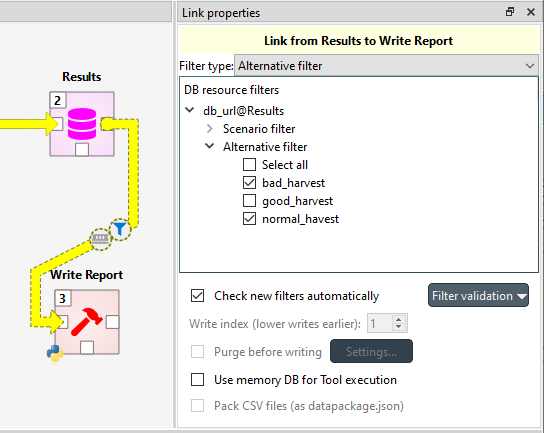
Want to get a comparison of bad and good harvest? Select bad_harvest and good_harvest for Alternative filter in Link properties. Want to report on normal harvest only? Select normal_harvest in Link properties.